



What Does Google Know About You? Complete Google Privacy Guide

Share
What Information Does Google Collect About You?
- What Does Google Really Know About You? The Answer May Surprise You
- Everything Google Can Learn About You From Your Everyday Searches
- You Use Google Every Day. Here’s What It Can Know About You
- Google Knows More About Your Digital Life Than You Might Realize
- What Happens to Your Data Every Time You Use Google?
Google is part of everyday internet life for billions of people. You may use Google Search to find information, Gmail to communicate, YouTube to watch videos, Chrome to browse the web, Google Maps to navigate, Google Photos to store pictures, Android to use your phone, and Google Drive to store documents.
All of these services can generate information about your activity.
So, what does Google actually know about you?
The answer depends on which Google products you use, which settings you have enabled, whether you are signed into a Google Account, and what information you provide directly.
Google’s privacy policy explains that it collects information people provide, information generated when they use its services, and information related to the devices, browsers, and applications used to access those services.
This does not mean Google has unlimited access to everything you do online. It also does not mean that turning off one setting makes you completely anonymous.
The important questions are what information is collected, where it is stored, what it is used for, how long it is retained, and what controls you have over it.
This guide explains the major categories of information Google can associate with your activity and how you can review, delete, export, and manage some of that information.
Table of Contents
- What Does Google Know About You?
- Your Google Search History
- Websites and Apps You Use
- Your YouTube Activity
- Your Location
- Google Maps Timeline
- Your Gmail Data
- Your Google Photos
- Your Google Drive Files
- Your Device Information
- Your IP Address
- Your Chrome Activity
- What Happens When You Use Incognito Mode?
- What About Google Ads?
- How Google Uses Your Activity
- Where Can You See What Google Has Saved?
- How to Delete Your Google Activity
- Does Deleting Google Activity Delete Everything?
- Can You Download What Google Has?
- A Google Privacy Audit You Can Perform Today
- Five Google Privacy Settings Worth Reviewing
- Google Privacy Is Not the Same as Complete Anonymity
- What Google Doesn’t Automatically Know
- What Happens When You Delete Your Google Account?
- The Biggest Privacy Mistake People Make
- The Bottom Line
- Frequently Asked Questions
1. What Does Google Know About You?
Depending on the Google services you use and your settings, information associated with your Google activity can include:
- Search activity
- YouTube activity
- Websites and apps associated with saved activity
- Location information
- Google Maps Timeline information
- Device information
- IP address and connection information
- Browser and operating system information
- Information you provide when creating or using an account
- Gmail messages and attachments
- Google Photos content
- Google Drive files
- Calendar information
- Information about interactions with Google services
- Advertising and personalization-related information
Google says its services can collect information about the apps, browsers, and devices used to access its services, including device type, operating system, browser settings, IP address, crash reports, system activity, and request information.
However, not all of this information is stored in one giant “Google profile” that you can see from a single screen.
Different types of data can exist in different Google products.
That distinction matters when trying to understand your digital privacy.
2. Your Google Search History
One of the most obvious categories of information Google can associate with you is your search activity.
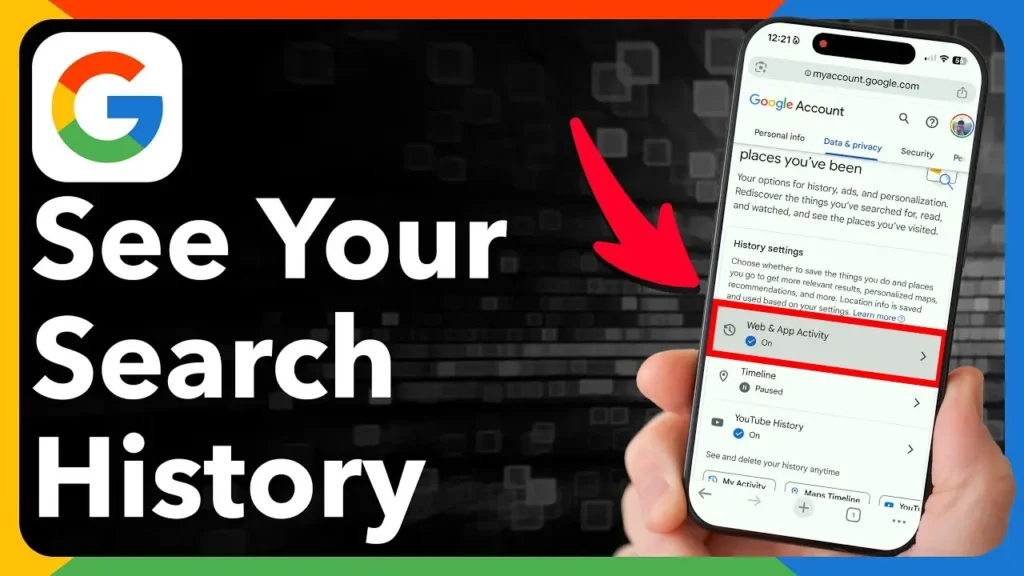
If you are signed into your Google Account and the relevant activity controls are enabled, searches can be saved to your account.
Google’s My Activity system allows users to view and manage activity such as searches, websites visited, and videos watched.
Search history can reveal much more than a list of keywords.
It can potentially reveal:
- Your interests
- Products you are considering buying
- Places you are researching
- Jobs you are looking for
- Travel plans
- Technology questions
- Hobbies
- Topics you regularly investigate
Over time, search history can become a detailed record of your interests and intentions.
This is why search history deserves more attention than simply asking whether a search engine remembers individual queries.
3. Websites and Apps You Use
Google’s activity systems can contain information about websites, apps, and other Google services depending on your settings and how you use them.
Google explains that My Activity can include activity from Google products, websites, apps, and devices that use Google services when you are signed into a Google Account.
This is important because some people think:
“I only use Google for searching.”
In reality, Google operates a large ecosystem.
Chrome, Android, YouTube, Maps, Gmail, Drive, Photos, and other services can generate different types of information.
Your Google privacy picture is therefore not determined by Google Search alone.
4. Your YouTube Activity
YouTube is another major source of activity information.
Your YouTube usage can include videos you watch and searches you perform.
Saved activity can be used to personalize experiences, including recommendations and the YouTube homepage.
Consider what years of YouTube history could reveal about someone.
It could potentially provide insights into:
- Interests
- Entertainment preferences
- Educational subjects
- Technology research
- News topics
- Music preferences
- Frequently watched channels
This is one reason Google privacy settings should not be viewed only through the lens of Search.
Your YouTube history can form another part of your digital activity profile.
5. Your Location
Location data can be particularly sensitive because it can reveal where you have been.
Google Maps provides a feature called Timeline that can record visits and routes when it is enabled.
Google says Timeline is off by default for a Google Account and can only be turned on when the user opts in. When enabled, precise device location can be regularly saved to Timeline.
Depending on your settings and usage, location information can reveal patterns involving:
- Home
- Work
- Restaurants
- Shops
- Airports
- Hotels
- Events
- Places you regularly visit
This makes location history one of the most important areas to review when conducting a Google privacy audit.
6. Google Maps Timeline
Google Maps Timeline deserves separate attention because it is more specific than simply saying “Google knows your location.”
Timeline is designed to help users remember places they have visited and routes they have taken.
Google says Timeline data comes directly from the device and that users can edit or delete Timeline data. Google also says that when Timeline backup is enabled, an encrypted copy can be stored on Google’s servers.
This illustrates an important privacy distinction:
What a company can collect is not always the same as what a particular feature stores when you enable it.
Understanding the difference helps prevent exaggerated claims about technology and privacy.
If Timeline is enabled on your device, reviewing its contents can give you a clearer picture of the location information associated with your Google ecosystem.
7. Your Gmail Data
If you use Gmail, Google stores your email content as part of providing the Gmail service.
Google’s privacy policy explains that information people create, upload, or receive while using its services can include emails, photos, videos, documents, and other content.
Your Gmail account can therefore contain:
- Emails you send
- Emails you receive
- Attachments
- Contact information
- Dates and times of communications
- Account settings
- Messages stored in your mailbox
For many people, Gmail contains years of personal and professional communication.
That makes email privacy an important part of understanding the overall data associated with a Google Account.
It is also important to distinguish between automated processing used to operate or secure services and claims about individual employees manually reading people’s emails. Privacy discussions should be based on Google’s published policies rather than unsupported assumptions.
8. Your Google Photos
Google Photos can contain some of the most personally revealing information in a Google Account.
People often store years of:
- Family photographs
- Travel photographs
- Screenshots
- Videos
- Documents
- Personal memories
Google’s privacy policy recognizes that users may upload photos and videos to its services.
The privacy question is therefore not simply:
“Does Google have my photos?”
If you use Google Photos to store your pictures, you have uploaded that content to Google’s service.
More useful questions include:
- Who can access shared content?
- What happens when you delete photos?
- How can you export your photos?
- Which account settings affect access?
- What information is associated with the content?
Google Photos should therefore be considered separately when reviewing your overall Google data.
9. Your Google Drive Files
Google Drive can contain another category of highly personal information.
People use Drive for:
- Business documents
- CVs
- Financial records
- School assignments
- Presentations
- Spreadsheets
- Contracts
- Personal documents
Google explains that documents and other content are stored in their respective products, such as Drive, rather than necessarily appearing inside My Activity.
This distinction is important.
If you open My Activity and do not see your entire Google life there, that does not mean Google does not store other content associated with the services you use.
Your Google Account can therefore contain information across multiple products, each with its own controls and storage mechanisms.

10. Your Device Information
Google does not only receive information about what you do.
It can also collect information about the devices, browsers, and applications you use to access its services.
Google’s privacy policy lists examples including:
- Device type
- Browser type
- Browser settings
- Operating system
- Mobile network information
- Carrier information
- Application version
- IP address
- Crash reports
- System activity
- Date and time of requests
- Referrer URL
This information can help Google operate its services, provide updates, detect abuse, improve security, and troubleshoot technical problems.
It also illustrates an important privacy principle:
Privacy is not only about the content you deliberately type into a search box.
Technical information can also contribute to a picture of how you interact with online services.
11. Your IP Address
An IP address is another piece of information that can be associated with online activity.
Google’s privacy policy identifies IP addresses among the information it collects when users interact with its services.
An IP address can provide information about a network connection and can be used as part of technical and security processes.
However, an IP address should not automatically be described as your exact physical address.
That would be an oversimplification.
The accuracy of location information derived from an IP address varies.
This distinction is important because IP-based information and precise device location are different categories of data.
12. Your Chrome Activity
Chrome introduces another layer of browser-related information.
Your browser can maintain information such as browsing history and other browsing data.
Google notes that browser activity may exist separately from My Activity.
This means deleting activity from your Google Account does not necessarily mean every piece of browser data has disappeared from every device.
For example, browser history can remain locally on a device until it is cleared.
This is another reason why people should not assume that deleting one category of Google activity removes every record associated with their online activity.
13. What Happens When You Use Incognito Mode?
Incognito mode is frequently misunderstood.
Private browsing can prevent certain browsing information from being stored locally in the normal browsing history, but it should not be interpreted as making you invisible online.
Google’s documentation notes that if you sign into a Google Account while using a private browsing window, search activity may still be stored in that account.
Therefore:
Incognito does not mean anonymous.
Private browsing is better understood as a tool that limits certain local browser records.
It does not automatically prevent every website, online service, network provider, or account from receiving or retaining information.
14. What About Google Ads?
Google operates a large advertising ecosystem.
Privacy discussions around Google advertising can become confusing because advertising personalization and data collection are related but are not identical concepts.
It is therefore better to examine:
- What information can be used for personalization
- Which advertising settings users can control
- What activity can influence recommendations
- How Google explains its advertising systems
- Which information users can manage
Google states in its My Activity documentation that it does not sell personal information.
The more useful privacy question is therefore not simply whether Google “sells your data.”
Instead, users should understand how information is collected and processed, what it is used for, and which controls are available.
15. How Google Uses Your Activity
Google says saved activity can be used to provide personalized experiences, including faster searches, recommendations, and a more personalized YouTube experience.
Data collection is not necessarily the end goal.
Companies collect and process information for different purposes.
For Google, published purposes can include:
- Providing services
- Improving services
- Personalizing experiences
- Security
- Preventing fraud and abuse
- Communications
- Advertising
- Developing and maintaining products
The exact purpose depends on the product, setting, and type of information involved.
This is why a privacy review should examine individual services rather than treating all Google data as one category.
16. Where Can You See What Google Has Saved?
Google provides several tools for users to review and manage their information.
One of the most important is My Activity.
Google says My Activity allows users to view and filter activity by date, product, and keyword and to manually or automatically delete certain activity.
Users can also access Google’s broader account privacy and data controls.
This makes My Activity a useful starting point for anyone who wants to understand their Google activity.
However, remember that My Activity is not necessarily a complete representation of everything stored across every Google service.
Gmail, Drive, Photos, Maps Timeline, and browser data may require separate reviews.
17. How to Delete Your Google Activity
Google provides options for deleting activity manually or automatically.
Users can delete individual activity, activity within a particular period, or supported activity more broadly. Automatic deletion options are also available for certain types of activity.
However, there is an important distinction:
Turning off future activity collection is not necessarily the same as deleting historical activity.
Data that has already been saved is not necessarily deleted simply because an activity setting is turned off.
Privacy management should therefore involve two separate questions:
- What information is already stored?
- What information will continue to be stored?
Both questions matter.
18. Does Deleting Google Activity Delete Everything?
Not necessarily.
Some information is stored in places other than My Activity.
For example:
- Gmail content exists in Gmail
- Files exist in Drive
- Photos exist in Google Photos
- Timeline data exists separately
- Browser history can exist on your device
Therefore, deleting My Activity should not automatically be interpreted as deleting every piece of information associated with every Google service you have used.
Anyone conducting a serious privacy cleanup should review the relevant Google products separately.
19. Can You Download What Google Has?
Yes.
Google provides Google Takeout, which allows users to export data from supported Google products.
Depending on the products you use, an export can include information from services such as Gmail, Drive, Calendar, Photos, and YouTube.
This is one of the most useful tools for understanding your Google data.
Instead of simply asking:
“What does Google have about me?”
you can request an export and inspect the information associated with the Google services you use.
Remember that exporting your information does not itself delete it from Google’s systems.
20. A Google Privacy Audit You Can Perform Today
If you want to understand your own Google data, work through these steps.
Step 1: Check My Activity
Review:
- Search activity
- YouTube activity
- Web and App Activity
- Other available activity
Look for patterns you did not realize were being stored.
Step 2: Check Location Timeline
If Timeline is enabled, review the places and routes associated with your account.
Review whether you still want that information stored.
Step 3: Check Your Google Account Privacy Controls
Review which activity controls are enabled.
Pay particular attention to settings that determine whether activity is saved or automatically deleted.
Step 4: Check Gmail
Look at old messages and attachments.
Ask yourself whether you still need years of stored communications.
Step 5: Check Google Photos
Review old photos, videos, shared albums, and content you no longer need.
Step 6: Check Google Drive
Review important documents and files.
Pay particular attention to files that have been shared with other people.
Step 7: Review Chrome
Remember that browser data can exist separately from your Google Account activity.
Step 8: Use Google Takeout
Export your information so you can inspect what is available across your Google services.
This audit gives you a more realistic understanding of your digital footprint than simply checking one privacy setting.
21. Five Google Privacy Settings Worth Reviewing
There is no single setting that makes Google completely private.
Instead, review the controls individually.
1. Web & App Activity
Check whether you want relevant activity saved to your account.
2. YouTube History
Review whether YouTube viewing and search activity should be retained.
3. Location and Timeline
Check whether you want Timeline enabled.
Google says Timeline is off by default and requires user opt-in.
4. Auto-delete
For supported activity, Google provides automatic deletion options.
Review the available periods and decide which settings make sense for you.
5. My Activity Verification
Google allows users to require an additional verification step to access their full My Activity history.
This can be useful when other people may have access to your device.
22. Google Privacy Is Not the Same as Complete Anonymity
This distinction is essential.
You can reduce the amount of information associated with your Google Account without becoming anonymous online.
Other parties can potentially have information about your online activity depending on the situation, including:
- Your internet service provider
- Websites you visit
- Mobile applications
- Your employer or school network
- Advertising technology companies
- Other online services
That’s why Google privacy is only one part of your overall digital privacy.
Protecting your privacy requires understanding the entire technology environment you use, not just one company.
23. What Google Doesn’t Automatically Know
A good privacy discussion should also explain what a company does not automatically have access to.
It would be inaccurate to tell readers that Google automatically sees everything they do online.
Your actual exposure depends on:
- Whether you use Google services
- Whether you’re signed into a Google Account
- Which Google products you use
- Which settings you have enabled
- Whether information is stored locally or remotely
- Whether another website or service independently collects the information
For example, using Google Search does not automatically mean Google has access to every private message you send through another unrelated service.
This distinction is important because privacy information should explain actual data flows rather than rely on sensational claims.
24. What Happens When You Delete Your Google Account?
Deleting individual activity is different from deleting a Google Account.
A Google Account can contain Gmail, Drive, Photos, YouTube information, Calendar data, and other content.
Deleting an entire account can therefore have much broader consequences than deleting individual activity.
Anyone considering account deletion should first export important information.
Google’s Takeout documentation explains that downloading data does not itself delete the data from Google’s systems.
A sensible process can therefore be:
Review → Export → Transfer → Delete
rather than immediately deleting everything.
25. The Biggest Privacy Mistake People Make
A common attitude toward privacy is:
“I have nothing to hide, so I don’t care.”
Privacy is not only about hiding wrongdoing.
Your data can reveal:
- Where you go
- What you search for
- What you watch
- Who you communicate with
- What interests you
- What you buy
- What places you visit
- What services you use
The issue is therefore not simply whether information is “secret.”
The more important questions are:
Who has access to it?
Why is it being processed?
How long is it retained?
How is it protected?
What choices do you have?
Those are fundamental questions of modern digital privacy.
The Bottom Line
Google’s ecosystem can contain a detailed record of your digital activity.
Depending on the services and settings you use, that can include search activity, YouTube activity, location information, device information, emails, photos, files, and other information associated with your interactions with Google’s products.
But there is an equally important second part of the story.
Google provides users with tools to review, export, delete, and control significant portions of this information.
My Activity allows you to review and manage supported activity.
Google Takeout allows you to export your data.
Google Maps Timeline provides controls for location history.
Account privacy settings allow you to manage various activity controls.
The goal should therefore not be to assume that Google either “knows everything” or “knows nothing.”
The reality is more specific.
Google can collect and associate information generated by the services you use and the choices you make within those services.
Understanding those data flows is the first step toward making informed decisions about your digital privacy.
Frequently Asked Questions
Does Google know everything I do online?
No. Google’s access depends on the services you use, your account status, your settings, and your interactions with Google services. Other companies and network providers may also collect information independently.
Can Google see my search history?
Google can save search activity to your Google Account when the relevant activity settings are enabled. My Activity provides tools for reviewing and deleting supported activity.
Can Google track my location?
Google Maps Timeline can save precise location information when Timeline is enabled. Google says Timeline is off by default and requires user opt-in.
Does Incognito stop Google from tracking me?
Incognito primarily limits certain local browser records. It does not make you anonymous, and signing into a Google Account while using private browsing can result in activity being saved to that account.
Can I download my Google data?
Yes. Google Takeout allows users to export data from supported Google products.
Does deleting My Activity delete everything Google has about me?
No. Some content is stored separately in products such as Gmail, Drive, and Photos, while some browser and Timeline data can also exist outside My Activity.
Can I stop Google from saving activity?
You can control many activity settings through your Google Account. Some settings allow you to turn off future saving or configure automatic deletion.
Does Google sell my personal information?
Google states in its My Activity documentation that it does not sell personal information.
How can I improve my Google privacy?
Start by reviewing My Activity, location settings, YouTube history, account privacy controls, Gmail, Photos, and Drive. You can also use Google Takeout to export your information and review what is associated with your Google services.
Related Privacy Guides
- How Long Does Google Keep Your Search History?
- Does Incognito Mode Really Protect Your Privacy?
- What Google Chrome Knows About You While You Browse
- How to Stop Google From Tracking Your Location
- Google Maps Location History: What Google Knows About Where You Go
- Gmail Privacy: Can Google Read Your Emails?
- What Happens to Your Gmail Data When You Delete Your Account?
- What Does Google Photos Know About You?
- Google Drive Privacy: Can Google See Your Files?
- Google Takeout Explained: How to Download Everything Google Knows About You?














Leave a Reply