



What Happens to Your Gmail Data When You Delete Your Account?

Share
- What Happens When You Delete Gmail?
- Does Deleting Gmail Delete Your Google Account?
- What Happens to Your Emails After You Delete Gmail?
- Does Google Delete Gmail Data Immediately?
- Can You Recover Gmail After Deleting It?
- What Happens to Gmail Attachments?
- What Happens to Gmail Contacts and Other Google Data?
- What Happens If You Delete Your Entire Google Account?
- How to Download Your Gmail Data Before Deleting It
- Does Deleting Gmail Delete Your Google Activity?
- What Happens to Emails You Sent to Other People?
- How to Delete Gmail Without Deleting Your Google Account
- How Gmail Deletion Fits Into Your Google Privacy Audit
- Frequently Asked Questions
- Final Takeaway
What Happens When You Delete Gmail?
Deleting Gmail does not necessarily mean deleting your entire Google Account.
Google allows you to remove Gmail as an individual Google service while keeping access to other services connected to your Google Account. Google says that when you remove Gmail, your emails and Gmail settings are deleted after 30 days.
This distinction is important because your Google Account can contain information from many different services.
For example, the same account may contain:
- Gmail messages
- Google Drive files
- Google Photos
- YouTube activity
- Google Maps activity
- Search activity
- Contacts
- Calendar information
- Google Play purchases
- Other Google service data
Removing Gmail does not automatically remove all of this information.
If you want to understand the wider picture of what Google can know about you, start with our main guide, What Does Google Know About You? Complete Google Privacy Guide.
The key point is simple:
Deleting Gmail and deleting your Google Account are two different actions.
Does Deleting Gmail Delete Your Google Account?
No.
Google specifically provides an option to remove Gmail without deleting the entire Google Account.
When you remove Gmail, you can continue using other Google services that are associated with your account.
However, Google requires you to provide an alternative email address if you want to continue using the Google Account after removing Gmail.
According to Google’s current instructions, you must verify the alternative email address before Gmail is removed. Until verification is completed, your Gmail address and emails are not removed.
This makes Gmail deletion different from deleting the entire Google Account.
Removing Gmail
You remove the Gmail service while keeping the Google Account.
Deleting the Google Account
You delete the account and the data and content associated with it across Google’s services.
The second option is considerably broader.
What Happens to Your Emails After You Delete Gmail?
When you remove Gmail from your Google Account, Google says your emails and Gmail settings are deleted after 30 days.
During that period, Google says you may be able to recover the Gmail address and emails.
After sufficient time has passed, recovery may no longer be possible.
This means users should not treat the deletion process as an instant wipe.
If you are deleting Gmail because you no longer want Google to retain your old emails, you should also understand the difference between:
- Removing Gmail
- Deleting individual messages
- Emptying Trash
- Deleting your Google Account
- Deleting activity stored elsewhere in your Google Account
These are not necessarily the same thing.
Our previous article, Gmail Privacy: Can Google Read Your Emails?, explains what Gmail processes while the service is active, including encryption, automated processing, spam detection, Smart Compose and other Gmail features.
Once you decide to leave Gmail, understanding the deletion process becomes the next step.
Does Google Delete Gmail Data Immediately?
No.
Google’s current Gmail help documentation says that after you remove Gmail from your Google Account, Gmail deletes your emails and settings after 30 days.
This provides an important distinction between requesting deletion and completion of deletion.
The process can also differ depending on exactly what you delete.
For example:
- Removing Gmail is different from deleting individual messages.
- Deleting Gmail is different from deleting your Google Account.
- Deleting Gmail is different from deleting Google Search activity.
- Deleting Gmail is different from deleting Google Maps Timeline.
- Removing Gmail does not automatically remove your other Google services.
Google also explains that deletion across Google systems can involve limited retention for certain purposes, including legal requirements and security or operational needs.
That does not mean deleted Gmail remains available to you indefinitely.
It means users should avoid interpreting a deletion request as a guarantee that every copy of every related piece of information disappears from every Google system at exactly the same moment.
Can You Recover Gmail After Deleting It?
Possibly, but you should not depend on recovery.
Google says that after removing Gmail, you may be able to recover your Gmail address and emails. However, if enough time has passed, you may no longer be able to recover your emails.
This is why downloading your important information before deleting Gmail is safer than relying on recovery later.
If the Gmail account contains:
- Business records
- Receipts
- Contracts
- Important conversations
- Account recovery information
- Tax documents
- Travel records
- Personal correspondence
- Attachments
you should export anything you need before starting the deletion process.
Google provides an official export system called Download Your Data, commonly known as Google Takeout.
What Happens to Gmail Attachments?
Attachments are part of your Gmail data.
Google’s Gmail export documentation says a Gmail data export can include:
- Message content
- Message headers
- Attachments
- Labels
- Drafts
- Sent messages
- Archived messages
- Spam
- Trash
- Filters
- Signatures
- Forwarding addresses
- Other Gmail settings
Therefore, if you delete Gmail without first exporting your information, you could lose access to attachments and other records associated with the mailbox.
This is particularly important for business users.
A Gmail inbox can function as an informal document archive for years, containing invoices, agreements, credentials, customer communications and files.
Deleting the mailbox without checking its contents first can result in permanent loss of information.
For organizations, Gmail should therefore be treated as a data repository rather than simply an email application.
What Happens to Gmail Contacts and Other Google Data?
Removing Gmail does not automatically delete your entire Google Account.
Google says that after removing Gmail, you can still access other Google services and activity that are not affected by Gmail removal.
This means your other Google data can remain.
For example, you may still have:
- Google Drive files
- Google Photos
- YouTube activity
- Search activity
- Google Maps data
- Contacts
- Calendar data
- Google Play information
This is one reason Google privacy should be viewed as an ecosystem rather than a collection of completely isolated services.
Our article How Long Does Google Keep Your Search History? explains how search activity can have its own retention and deletion controls.
Likewise, Google Maps Location History: What Google Knows About Where You Go explains how Timeline data is handled separately from other Google activity.
Deleting Gmail does not automatically perform those other privacy actions.
What Happens If You Delete Your Entire Google Account?
Deleting the entire Google Account is much broader.
Google says deleting a Google Account means losing data and content associated with that account, including:
- Emails
- Files
- Calendars
- Photos
- Google services associated with the account
- Certain purchases and subscriptions
- Other account-related content
You can also lose access to services where that account is used to sign in.
This is why Google recommends reviewing and downloading important account information before deleting the account.
If you use your Gmail address to log into other services, Google specifically recommends changing the email address associated with those services before deleting the account.
Think about:
- Banking
- Social media
- Shopping websites
- Developer accounts
- Government services
- Cloud services
- Job platforms
- Newsletters
- Business accounts
- Password recovery systems
Deleting a Google Account before updating these services can create access problems.
How to Download Your Gmail Data Before Deleting It
Before deleting Gmail, export anything you want to preserve.
Google’s Download Your Data system allows users to export information from Google products. Gmail is one of the supported products.
A basic process is:
Step 1: Open Google Takeout
Sign into the Google Account containing the Gmail data you want to preserve.
Step 2: Select Gmail
Choose Gmail from the available Google products.
Step 3: Choose the information to export
Depending on the available options, you can select the Gmail data you want included.
Step 4: Create the export
Google will prepare an archive of your selected information.
Step 5: Download the archive
Store the resulting files somewhere secure.
Google says downloading your data does not delete the information from Google’s servers. Exporting and deleting are separate actions.
This distinction is extremely important.
Google Takeout is a backup and portability tool, not a deletion tool.
Does Downloading Gmail Data Delete It From Google?
No.
This is one of the easiest privacy concepts to misunderstand.
Google explicitly states that downloading your data does not delete it from Google’s servers.
For example, if you export your Gmail messages today, the original messages remain in Gmail.
If your objective is to leave Gmail and remove the data from your Google Account, you need to perform the appropriate deletion action separately.
A sensible sequence is:
Review → Export → Verify backup → Update dependent accounts → Delete
Do not reverse that sequence.
If you delete first and discover later that an important business document was inside the mailbox, recovery may not be possible.
Does Deleting Gmail Delete Your Google Activity?
Not necessarily.
This is another important distinction.
Google’s My Activity system stores certain activity across Google products, but Google says some products store information elsewhere. Gmail itself is one of the services where content and files are managed directly within the product rather than simply through My Activity.
Google also states that deleting activity does not necessarily delete information stored elsewhere.
For example:
- Gmail stores email content.
- Google Drive stores files.
- Google Photos stores photos.
- Timeline stores location data.
- Chrome can store browsing history.
- My Activity stores certain account activity.
Therefore, deleting Gmail should not be interpreted as deleting your entire Google activity history.
If you want to clean up your broader Google activity, review the appropriate Google Account controls separately.
This connects with our article Is Google Really Tracking Everything You Search?, which explains how Google Search activity is handled separately from Gmail.
What Happens to Emails You Sent to Other People?
Deleting your Gmail account does not automatically delete copies of messages that you previously sent to other people.
If you sent someone an email, that recipient may have their own copy.
They may also have:
- Downloaded your attachment
- Forwarded the message
- Archived it
- Printed it
- Backed it up
- Stored it in another email system
Deleting your Gmail account therefore does not mean that every copy of every message disappears from the internet or from other people’s accounts.
This is a fundamental principle of digital communication.
You can delete your copy without being able to delete someone else’s copy.
The same principle applies to screenshots, downloaded attachments and forwarded messages.
This is one reason privacy protection is often more effective when considered before information is shared rather than after.
How to Delete Gmail Without Deleting Your Google Account
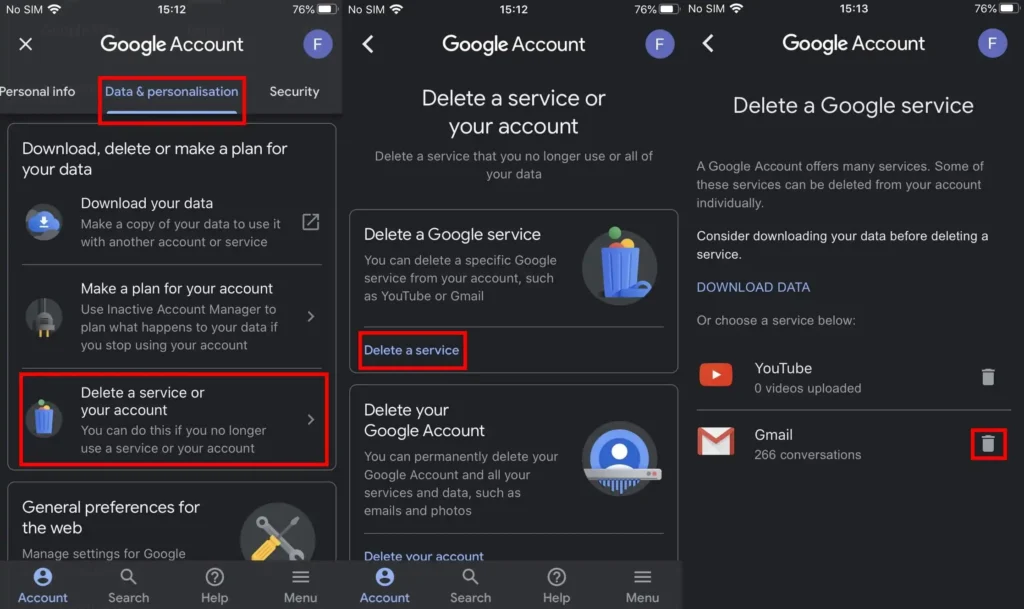
If you want to remove Gmail but keep your Google Account, Google provides a dedicated process.
According to Google’s current instructions:
- Open your Google Account.
- Go to Data & privacy.
- Find the section for data from apps and services.
- Select the option to delete a Google service.
- Select Gmail.
- Enter an alternative email address.
- Verify that address.
- Complete the Gmail removal process.
Google says the alternative address is required because you need another way to sign in to the Google Account after Gmail has been removed.
Before doing this, make sure you have exported any information you need.
Also check whether your Gmail address is used as a recovery address or login address on other websites.
How Gmail Deletion Fits Into Your Google Privacy Audit
Deleting Gmail is only one part of a larger Google privacy audit.
Your Google Account can connect multiple services and data categories.
A useful privacy review can therefore move through the following sequence.
1. Start with the Google privacy overview
Read What Does Google Know About You? Complete Google Privacy Guide.
This is the pillar article for the entire cluster.
2. Review Google Search
Read Is Google Really Tracking Everything You Search?.
This covers what Google can learn from your searches.
3. Review search retention
Read How Long Does Google Keep Your Search History?.
This focuses on retention and deletion controls.
4. Review private browsing
Read Does Incognito Mode Really Protect Your Privacy?.
Incognito does not make you universally anonymous.
5. Review Chrome
Read What Does Google Chrome Know About You While You Browse?.
This examines browser-related data collection.
6. Review Google Maps
Read Google Maps Location History: What Google Knows About Where You Go.
This focuses on Google’s location and Timeline system.
7. Review location controls
Read How to Stop Google From Tracking Your Location.
This provides practical steps for reducing location-related collection.
8. Review Gmail
Read Gmail Privacy: Can Google Read Your Emails?.
This explains Gmail’s encryption, automated processing, privacy controls and AI-related considerations.
9. Then review Gmail deletion
You are now reading the final Gmail-specific article in this part of the cluster.
This creates a natural path:
Google Privacy → Search → Search History → Incognito → Chrome → Maps → Location → Gmail → Gmail Deletion
That structure gives both readers and search engines a clear relationship between the articles.
Frequently Asked Questions
Does deleting Gmail delete my entire Google Account?
No. You can remove Gmail while keeping your Google Account and other Google services.
How long does Google take to delete Gmail?
Google currently says that after you remove Gmail from your Google Account, Gmail deletes your emails and settings after 30 days.
Can I recover Gmail after deleting it?
You may be able to recover your Gmail address and emails for a period after deletion, but Google warns that recovery may not be possible after enough time has passed.
Does deleting Gmail delete Google Drive?
No. Removing Gmail does not automatically delete your Google Drive data. Deleting the entire Google Account is a separate and broader action.
Does deleting Gmail delete my Google Search history?
No. Gmail deletion does not automatically delete other Google Account activity such as Search activity. Different Google products and activity systems have separate controls.
Does Google Takeout delete my Gmail data?
No. Google explicitly says downloading your data does not delete it from Google’s servers.
Can I download my Gmail emails before deleting Gmail?
Yes. Google provides a data export system that can include Gmail message content, headers, attachments, labels and other Gmail information.
Will deleting my Gmail delete emails I sent to other people?
No. Deleting your Gmail account does not automatically delete copies of messages that recipients already received or stored.
What happens if I delete my entire Google Account?
Google says you lose the data and content associated with the account, including Gmail, Drive, Calendar and Photos, as well as access to services that use that account for sign-in.
Should I download my data before deleting Gmail?
Yes. Google itself recommends downloading your data before removing Gmail or deleting your Google Account.
Final Takeaway
Deleting Gmail is not the same thing as deleting your Google Account.
If you remove only Gmail, Google says your emails and Gmail settings are deleted after 30 days, while your broader Google Account and unaffected services can remain available.
If you delete the entire Google Account, the consequences are much broader because your account can contain emails, files, photos, calendars, purchases and information from other Google services.
Before deleting anything, the safest sequence is:
Review your data → Download what you need → Update accounts using your Gmail address → Verify your backup → Delete Gmail or the Google Account
And remember that deleting your own mailbox cannot erase copies of messages that other people have already received.
For the complete picture of Google’s data ecosystem, continue with What Does Google Know About You? Complete Google Privacy Guide and work through the connected Google privacy articles.
Official Sources
- Google Account Help, Remove Gmail from your Google Account.
- Google Account Help, Delete your Google Account.
- Google Account Help, How to download your Google data.
- Gmail Help, Export your data from Gmail.
- Google Account Help, How Google helps you delete data from your account.
- Google Account Help, Manage your Google data with My Activity.
















Leave a Reply