



Google Maps Location History: What Google Knows About Where You Go

Share
- Google Maps Knows Where You’ve Been. Here’s What It Can See
- What Does Google Maps Really Know About Where You Go?
- Google Knows Where You’ve Been. Here’s How Location History Works
- Your Google Maps Location History May Reveal More Than You Think
- How Much Does Google Know About Your Location? Here’s the Answer
Your phone can know where you are, where you have been and, depending on your settings, the routes you regularly take.
Google Maps can turn some of that information into a personal record called Timeline.
Timeline can help you remember places you visited, routes you traveled and trips you took. But from a privacy perspective, location information can reveal an enormous amount about someone’s life.
A location history can potentially reveal where someone:
- Lives
- Works
- Shops
- Travels
- Spends time
- Meets people
- Visits regularly
- Goes for entertainment
- Travels on weekends
- Goes on holidays
Google’s current system is also different from the way many people remember “Location History” working in the past.
Google says Timeline is now designed around storing precise location information on eligible devices. Users can optionally create an encrypted backup on Google’s servers. Timeline is also off by default and requires the user to turn it on.
That distinction matters.
Turning off Google Maps Timeline does not necessarily mean Google has no location-related information associated with your activity. Other Google services and settings can still process location information.
This article explains what Google Maps Timeline is, what information it can contain, where that information is stored, how long it can remain available, and how you can control it.
For the bigger picture, start with our What Does Google Know About You? Complete Google Privacy Guide.
Table of Contents
- What Is Google Maps Timeline?
- What Does Google Maps Know About Where You Go?
- How Does Google Determine Your Location?
- Does Google Maps Track Your Location All the Time?
- Where Is Google Maps Timeline Data Stored?
- Is Google Maps Location History Stored in Your Google Account?
- Can Google See Your Location Even When Maps Is Closed?
- Does Turning Off Timeline Stop All Google Location Tracking?
- How Long Does Google Keep Location History?
- Can You Delete Google Maps Location History?
- What Happens When You Delete Timeline Data?
- Google Location Tracking and Search Activity
- Google’s Recent Location Privacy Enforcement
- How to Check What Google Knows About Your Location
- How to Reduce Google’s Location Tracking
- Frequently Asked Questions
- Final Takeaway
What Is Google Maps Timeline?
Google Maps Timeline is a feature that helps you remember where you have been.
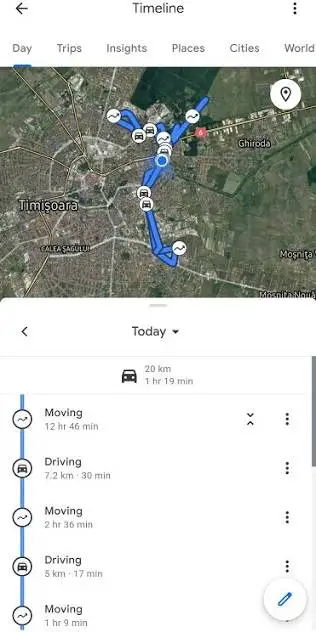
When Timeline is enabled, Google says your visits and routes can be automatically saved to a map on each eligible signed-in device.
For example, Timeline can potentially show that you:
- Visited a particular restaurant
- Traveled between two locations
- Spent time at a particular place
- Took a particular route
- Visited a city
- Went on a trip
The feature can therefore become much more than a simple list of map searches.
Over time, it can create a detailed record of movement.
Google says Timeline is off by default and can only be turned on when the user opts in.
This is an important change from the way many older discussions about Google Location History describe the feature.
If you search online for “Google Location History,” you may find explanations based on older Google systems. Google’s current documentation now refers heavily to Timeline and device-based storage.
What Does Google Maps Know About Where You Go?
When Timeline is enabled, it can contain information about your visits and routes.
That can create a surprisingly detailed picture of your movements.
For example, a location record could help answer questions such as:
Where were you yesterday?
What places did you visit last weekend?
How often do you visit a particular location?
Which route did you take?
What cities have you visited?
The privacy significance is not just the individual location.
It is the pattern created by many locations over time.
A single location may tell very little.
Thousands of location points can reveal much more.
A long-term location record can potentially reveal recurring routines, workplaces, homes, travel patterns and frequently visited places.
That is why location data is considered highly sensitive information in many privacy discussions.
How Does Google Determine Your Location?
Google can estimate a device’s location using several signals.
Google’s current Timeline documentation says location can be estimated using:
- GPS
- Wi-Fi networks
- Mobile networks
- Sensor information
These technologies can work together to estimate where a device is.
GPS can provide highly precise positioning when satellite signals are available.
Wi-Fi information can help estimate location in environments where GPS is weaker.
Mobile networks can provide another source of location information.
Device sensors can also contribute to positioning.
This means location tracking is not simply about whether you have opened Google Maps.
A smartphone has several systems capable of contributing to location information.

Does Google Maps Track Your Location All the Time?
This depends on your settings.
When Google Maps Timeline is enabled, Google says precise device location can be regularly saved to the device, including when Google apps are not being used.
That is different from saying:
“Google Maps is watching your location every second.”
The actual behavior depends on the device, operating system, settings and Google services involved.
Timeline is designed to record visits and routes rather than simply provide a live location feed.
Google also states that Timeline settings do not control other location services on your device, such as Google Location Services, Location Sharing or Find Hub.
Therefore, turning Timeline on or off should not be interpreted as a universal switch for every location-related function on your phone.
Where Is Google Maps Timeline Data Stored?
This is one of the biggest changes in Google’s current approach.
Google says Timeline data comes directly from your device.
When Timeline is enabled, precise location information is regularly saved to the device.
Google also gives users the option to create an encrypted backup of Timeline data on Google’s servers.
This means there are two important concepts to understand:
Device storage
Your Timeline information can be stored directly on an eligible device.
Encrypted backup
You can choose to back up Timeline information to Google’s servers in encrypted form, allowing you to restore it if you change or lose your device.
This device-based approach is important because many older explanations assume all Google Location History is simply stored centrally in your Google Account.
That is no longer an accurate description of the current Timeline system.
Is Google Maps Location History Stored in Your Google Account?
The answer depends on which location data you mean.
Google’s current Timeline system stores Timeline information on eligible devices, with an optional encrypted backup to Google’s servers.
However, Google also has other systems that can process location-related information.
For example, Google states that if settings such as Search Services History or Web & App Activity are enabled, your Google Account may still save certain location information associated with your use of Google services.
This distinction is extremely important.
Turning off Timeline does not necessarily mean:
“Google has no location information about me.”
It means that Timeline itself is no longer saving new location data in the Timeline system.
Other Google services can have separate settings.
For that reason, you should review your Google Account activity settings as well as Google Maps Timeline.
Can Google See Your Location Even When Maps Is Closed?
Potentially, yes, depending on the services and settings you have enabled.
Google’s current Timeline documentation specifically states that when Timeline is on, precise device location can be regularly saved to the device even when Google apps are not in use.
But this does not mean that Google Maps itself is constantly running on your screen.
Location processing can occur through the operating system and other services.
Your phone’s location settings also control whether applications can access location information.
This is why reviewing app-level location permissions is important.
On both Android and iPhone, you can review which applications have access to your location and whether access is allowed all the time, only while using the app, or not at all.
Does Turning Off Timeline Stop All Google Location Tracking?
No.
This is one of the most important points in Google’s current documentation.
Google says that when Timeline is turned off, the device does not save its location to Timeline.
However, other services can still save location information.
Google specifically gives the example that Search Services History or Web & App Activity can still include location information associated with your use of Google sites, apps and services.
For example, Google says other location information can include:
- General area
- IP address-related location
- Location associated with Search
- Location associated with Maps activity
- Location information included in photos depending on camera settings
Therefore, a complete Google location privacy check should include more than Timeline.
You should also review:
- Timeline
- Search Services History
- Web & App Activity
- Location Services
- Location Sharing
- Device-level app permissions
- Photo location settings
How Long Does Google Keep Location History?
There is no single universal retention period for all Google location information.
The answer depends on the specific Google product and setting involved.
Timeline data can remain according to your Timeline settings until you delete it, and Google provides controls for managing and deleting Timeline information.
Google also says that Timeline can be subject to auto-delete settings.
This means you should not assume that every piece of location information follows one universal retention schedule.
This is similar to the distinction we covered in How Long Does Google Keep Your Search History?.
Search history, Chrome history, Timeline data and other Google activity are separate systems.
The retention rules can therefore differ.
Can You Delete Google Maps Location History?
Yes.
Google allows users to review and delete Timeline data.
You can delete:
- Individual visits
- Individual routes
- Portions of Timeline
- All Timeline data
Google says Timeline data can be edited or deleted at any time.
The exact controls available to you can depend on your device and the current version of Google Maps.
Because Google has moved Timeline toward device-based storage, the Google Maps mobile app is particularly important for managing current Timeline data.
If you change phones, Google also provides encrypted backup functionality so Timeline can be transferred to another device when backup is enabled.
What Happens When You Delete Timeline Data?
Deleting Timeline data removes that information from the Timeline system.
However, deleting Timeline does not necessarily delete every piece of location-related information associated with your Google activity.
Google explicitly warns that other settings such as Search Services History and Web & App Activity can continue to save location-related information.
For example, Google says information such as general location and IP address-related location can still be saved as part of activity on Search and Maps when relevant settings are enabled.
This is why privacy management needs to be viewed as a system rather than a single switch.
Deleting one dataset does not automatically delete every other dataset.
Google Location Tracking and Search Activity
Location and search activity can overlap.
When you search for something on Google, the service may use location-related information to provide more relevant results.
For example, searches for:
- Restaurants near me
- Pharmacies near me
- ATMs nearby
- Hotels nearby
- Stores near me
naturally require some understanding of your approximate location.
Google’s current documentation says location information can be saved through Search Services History and Web & App Activity depending on your settings.
This means someone concerned about Google location privacy should not focus only on Google Maps.
Search activity matters too.
For a deeper look at search tracking, see Is Google Really Tracking Everything You Search?.
And if you want to understand how search activity can be retained, read How Long Does Google Keep Your Search History?.
Google’s Recent Location Privacy Enforcement
Google’s handling of location data has also faced regulatory scrutiny.
On September 21, 2026, Ireland’s Data Protection Commission announced a €403 million fine against Google following an investigation into the company’s processing of location data between 2018 and 2020. The regulator said the case involved Google’s Web & App Activity, Location History and Location Accuracy features during that period.
The regulator said its findings concerned issues including lawfulness and fairness and stated that users could have been unaware of some ways their location information was used, including for advertising and inferred interests.
Google said the case concerned historical policies and that it had subsequently introduced changes to location-data controls and practices. Reuters reported that Google pointed to measures including automatic deletion, device-based Timeline storage and changes to how location information is handled.
This distinction is important.
The regulatory case concerned historical practices from 2018 to 2020. It should not be presented as evidence that Google’s current Timeline system operates exactly as it did during that period.
Google’s current documentation describes a substantially different Timeline architecture, including device-based storage and optional encrypted backup.
How to Check What Google Knows About Your Location
If you want to see what Google currently has available through Timeline, start with Google Maps on your mobile device.
Look for Timeline and review:
- Recent places
- Previous visits
- Routes
- Travel history
- Saved locations
- Timeline settings
- Backup settings
- Auto-delete settings
You should also review your Google Account activity controls.
Check whether:
- Timeline is enabled
- Web & App Activity is enabled
- Search Services History is enabled
- Location-related permissions are enabled
- Location Sharing is active
- Google apps have background location access
The goal is not necessarily to turn every setting off.
The goal is to know what is enabled.
How to Reduce Google’s Location Tracking
If you want to reduce the amount of location information associated with your Google activity, take a systematic approach.
1. Review Google Maps Timeline
Open Google Maps and check whether Timeline is enabled.
If you do not need a historical record of your movements, consider turning it off.
Google says Timeline can be turned off at any time.
2. Review Timeline backup
If you use Timeline but do not want an encrypted backup stored on Google’s servers, review your backup settings.
Google says Timeline backup is optional.
3. Review Web & App Activity
Timeline is not the only place where location information can appear.
Review Web & App Activity and related Google Account settings.
4. Review Search Services History
Google is currently rolling out changes to settings covering Search, Maps and other Search services.
Google says some users may still see Web & App Activity controlling history and personalized recommendations while the new settings roll out.
This means the exact interface can differ between accounts.
5. Review phone permissions
Go through your phone’s location permissions and check which applications have access.
Consider whether each application genuinely needs location access.
6. Review Location Sharing
Location Sharing is separate from Timeline.
If you share your real-time location with another person, turning off Timeline does not automatically stop that sharing.
Google specifically identifies Location Sharing as a separate location service.
7. Review photos
Photos can contain location information depending on your camera and photo settings.
If you share photographs publicly, location metadata can sometimes reveal where an image was taken.
8. Review your Google Account regularly
Privacy settings change.
Google also changes how its services store and process data.
A privacy audit should therefore be something you repeat periodically rather than something you do once.
Google Maps Location Privacy Checklist
Use this quick checklist if you want to audit your Google location settings:
| Privacy area | What to check |
|---|---|
| Google Maps Timeline | Is it enabled? |
| Timeline backup | Is encrypted backup enabled? |
| Timeline auto-delete | What retention option is selected? |
| Web & App Activity | Is it enabled? |
| Search Services History | What setting controls your account? |
| Location Sharing | Are you sharing your location? |
| Phone permissions | Which apps can access location? |
| Background location | Which apps have background access? |
| Photos | Are location details being stored? |
| Google Account | Which devices are signed in? |
This checklist gives you a much more complete picture than simply asking whether Google Maps is tracking you.
Frequently Asked Questions
Does Google Maps track your location?
Google Maps can record location information through features such as Timeline when you have opted into the feature. Google’s current documentation says Timeline is off by default and can save visits and routes to eligible signed-in devices when enabled.
Does Google Maps Timeline save my location when the app is closed?
When Timeline is enabled, Google says precise device location can be regularly saved to the device even when Google apps are not being used.
Is Google Maps Timeline on by default?
Google currently states that Timeline is off by default and can only be turned on if you opt in.
Where does Google Maps Timeline store my location history?
Current Google documentation says Timeline data is stored directly on eligible devices. Users can optionally create an encrypted backup on Google’s servers.
Does turning off Timeline stop Google from knowing my location?
Not necessarily. Google states that other services such as Search Services History and Web & App Activity may still save location-related information depending on your settings.
Can I delete my Google Maps Timeline?
Yes. Google provides controls for editing and deleting Timeline data, including deleting individual visits or all Timeline data.
Can Google know where I am without Google Maps?
Location information can be processed through several Google services and device-level systems. Google says Timeline can save location even when Google apps are not being used, while other services can separately process location-related information.
Does Google know everywhere I have been?
Not necessarily. What Google can access depends on the services you use, your settings, your device and whether features such as Timeline are enabled.
Can Google track my location through my IP address?
Google says location-related information such as a general area and IP address-related location can be saved as part of activity on Search and Maps when relevant settings are enabled.
Is Google Maps Timeline the same as Location History?
Google’s current documentation uses Timeline for the feature that records visits and routes. Older Google documentation and third-party articles often refer to the broader feature as Location History. The current Timeline system has also shifted toward device-based storage with optional encrypted backup.
Does Google keep location history forever?
There is no single retention period for all Google location information. Timeline is governed by its own settings, while other Google services can retain separate location-related information according to their own controls.
Final Takeaway
Google Maps can provide a detailed picture of where you have been, but the current privacy architecture is more complicated than the old idea that Google simply stores a complete location history in your Google Account.
Today’s Google Maps Timeline is designed around device-based storage.
When Timeline is enabled, Google says precise location can be regularly saved to eligible devices. You can also choose to create an encrypted backup on Google’s servers.
But Timeline is only one part of Google’s location ecosystem.
Search activity, Web & App Activity, Google Location Services, Location Sharing, IP-based information and other Google services can involve location-related data separately.
That means turning off one setting does not necessarily eliminate every form of location information associated with your Google activity.
If you want to understand the broader picture, continue with What Does Google Know About You? Complete Google Privacy Guide.
Then explore:
Is Google Really Tracking Everything You Search?
How Long Does Google Keep Your Search History?
Does Incognito Mode Really Protect Your Privacy?
What Does Google Chrome Know About You While You Browse?
Together, these articles cover Google’s search, browser, account and location privacy layers.
Sources
- Google Account Help, Manage your Timeline data.
- Google Maps Help, Manage your Google Maps Timeline.
- Reuters, Irish privacy regulator fines Google €403 million over location data processing, September 21, 2026.












Leave a Reply