



Attackers Exploit Microsoft Teams External Chat to Impersonate IT Support

Share
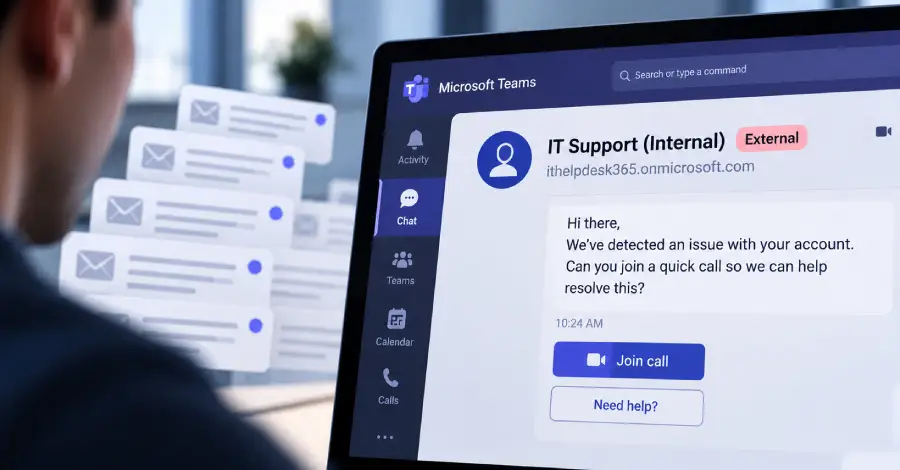
Threat actors are increasingly exploiting Microsoft Teams’ external chat feature to conduct impersonation scams, deliver malware, and gain initial access to enterprise networks for ransomware deployments.
Cybersecurity researchers have identified a recurring social engineering pattern spanning hundreds of documented incidents. Attackers create throwaway Microsoft 365 tenants configured with domain names designed to mimic legitimate IT helpdesk services or corporate support teams. Using these disposable accounts, attackers initiate external messaging sessions directly with target employees inside corporate environments.
How the Teams IT Support Scam Works
The attack relies on Microsoft Teams’ default external access settings, which permit users from external domains to message internal employees unless explicitly restricted by system administrators. Threat actors exploit this trust mechanism by impersonating internal IT staff notifying users of urgent technical issues, mandatory security updates, or multi-factor authentication (MFA) resets.
Once a target responds, the attacker guides them into executing remote access utilities or downloading malicious payloads disguised as corporate diagnostic software. In many observed cases, attackers instruct victims to approve remote assistance requests using native operating system utilities such as Quick Assist, enabling unauthorised remote access to corporate endpoints.
After establishing initial persistence on an endpoint, threat actors extract cached credentials, escalate privileges, and move laterally across internal networks. These intrusions frequently culminate in exfiltrating sensitive organizational data and deploying enterprise ransomware.
Mitigation and Administrative Guidance
Enterprise security teams can reduce exposure to external chat abuse by adjusting tenant-wide communication policies within the Microsoft Teams admin centre. Security experts recommend restricting external domain communications exclusively to approved partner organisations or completely disabling external chat for users who do not require external collaboration.
Organisations are also advised to enforce strict internal identity verification procedures for all IT support interactions, ensuring employees verify unusual communications through out-of-band channels before granting remote access or downloading requested software.
















Leave a Reply